
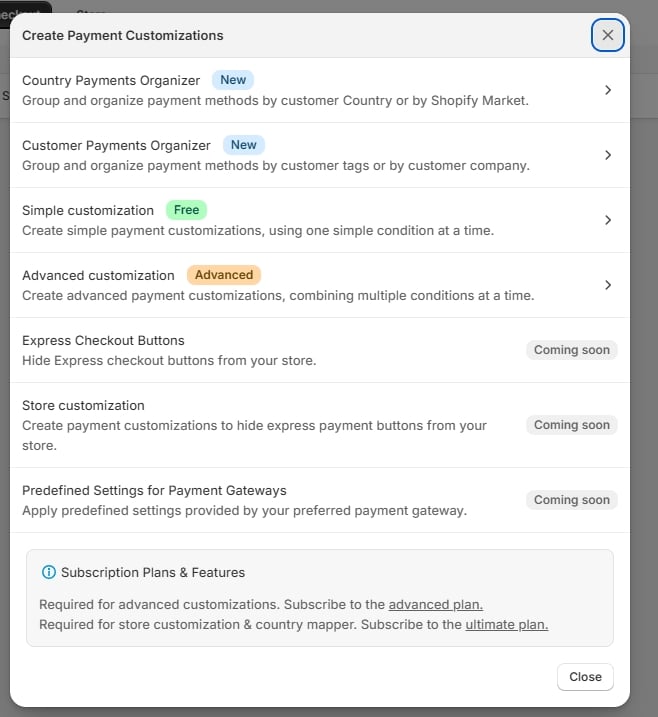
The list
Entries marked Coming soon are shown greyed out and cannot be clicked.
The two Organizer entries open a second level rather than an editor:
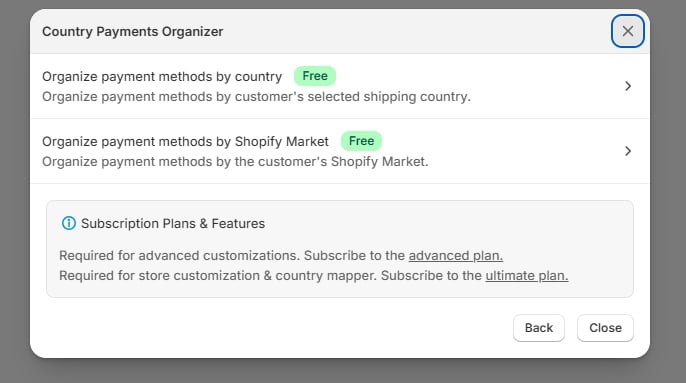
Which one do I want?
Ask what the rule keys off:- A place — country, region, or market → Country Payments Organizer
- A kind of customer — tags or B2B company → Customer Payments Organizer
- One fact about the cart — total, weight, currency, contents → Simple customization
- More than one fact at once — “over ₹5,000 and shipping to Germany” → Advanced customization
Starting over
If you pick wrong, hit Discard in the top bar. Nothing is saved until you press Save.There is no conversion between rule types. A simple rule cannot be promoted to an advanced one — you would rebuild it. If you suspect a rule will grow, start advanced.